> ## Documentation Index
> Fetch the complete documentation index at: https://docs.flexwash.com/llms.txt
> Use this file to discover all available pages before exploring further.
# Deposits
> Reconcile bank deposits with daily sales and understand exactly where your revenue comes from.
The Deposits report breaks down daily sales into four sections: what you sold,
how customers paid, what Adyen deposited, and your net revenue. Use it to
reconcile your bank account to the penny.
## Accessing the Report
Navigate to **Accounting > Deposits**, select a date range, and click **Run**.
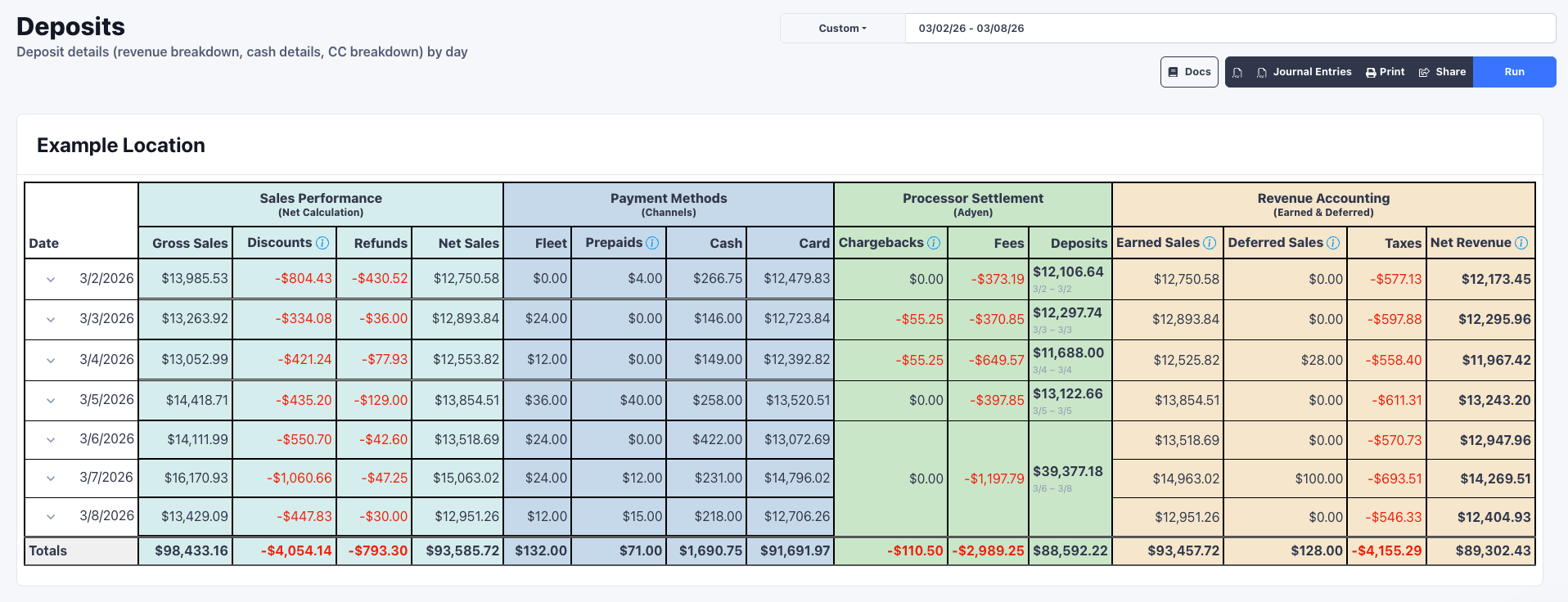 ### Sales Performance
Shows what was operationally sold each day.
| Column | Description |
| ----------- | ---------------------------------- |
| Gross Sales | Total sales before any adjustments |
| Discounts | Promotions and discounts applied |
| Refunds | Money returned to customers |
| Net Sales | Gross - Discounts - Refunds |
**Net Sales** matches your dashboard and represents what was collected that day.
### Payment Methods
Breaks down Net Sales by how customers paid.
| Column | Description |
| -------- | -------------------------------------------------------------- |
| Fleet | Billed separately to fleet accounts at a later date |
| Prepaids | Gift cards and wash books redeemed (deferred revenue realized) |
| Cash | Cash payments collected |
| Card | Credit and debit card payments |
### Processor Settlement
Shows how Adyen calculates your deposit. Adyen deposits net of fees, so:
**Card - Chargebacks - Fees = Deposit**
| Column | Description |
| ----------- | ------------------------------------------------------ |
| Chargebacks | Chargeback activity affecting your deposit (see below) |
| Fees | Adyen processing fees |
| Deposits | Amount deposited to your bank account |
FlexWash includes built-in chargeback management through Adyen. The Chargebacks
column reflects both directions: negative when a chargeback is filed or you lose
a dispute, positive when you win a defense and funds are returned.
The Deposits column displays the settlement date range (e.g., "3/2 - 3/2").
Adyen uses a T+2 deposit schedule with funds arriving by **1:30 PM PST via ACH**.
Bank holidays will delay deposits by one business day.
| Sale Day | Deposit Day |
| --------------- | ----------- |
| Monday | Wednesday |
| Tuesday | Thursday |
| Wednesday | Friday |
| Thursday | Monday |
| Friday - Sunday | Tuesday |
This amount should match your bank statement exactly.
This report in FlexWash will reflect the deposit information the evening AFTER
the deposit is paid.
### Revenue Accounting
Calculates net revenue using accrual accounting principles.
| Column | Description |
| -------------- | --------------------------------------------------------------- |
| Earned Sales | Revenue recognized from services performed |
| Deferred Sales | Prepaid products sold (gift cards, wash books) not yet redeemed |
| Taxes | Total tax liability for that day \* |
| Net Revenue | Earned Sales - Deferred Sales - Taxes |
**Net Revenue** represents the true revenue earned that day, excluding
prepaid sales that will be recognized when redeemed.
\* **Taxes reflects your tax *liability* for the day, not just the sales
tax *collected* that day.** When an order is refunded, the tax charged on that
order is returned to the customer, so it reduces your tax
liability. That reversal is applied on the **day the refund is issued**.
**Example:** On April 1st a cutsomer pays \$47.93 and \$2.97 in taxes. You refunded
this order on May 1st. On May 1st your tax liability decreases by \$2.97.
For this reason, the **Taxes** column may not match reports that total the raw
tax line items collected on a given day (such as the Revenue Analytics or Line
Item Detail reports).
### Sales Performance
Shows what was operationally sold each day.
| Column | Description |
| ----------- | ---------------------------------- |
| Gross Sales | Total sales before any adjustments |
| Discounts | Promotions and discounts applied |
| Refunds | Money returned to customers |
| Net Sales | Gross - Discounts - Refunds |
**Net Sales** matches your dashboard and represents what was collected that day.
### Payment Methods
Breaks down Net Sales by how customers paid.
| Column | Description |
| -------- | -------------------------------------------------------------- |
| Fleet | Billed separately to fleet accounts at a later date |
| Prepaids | Gift cards and wash books redeemed (deferred revenue realized) |
| Cash | Cash payments collected |
| Card | Credit and debit card payments |
### Processor Settlement
Shows how Adyen calculates your deposit. Adyen deposits net of fees, so:
**Card - Chargebacks - Fees = Deposit**
| Column | Description |
| ----------- | ------------------------------------------------------ |
| Chargebacks | Chargeback activity affecting your deposit (see below) |
| Fees | Adyen processing fees |
| Deposits | Amount deposited to your bank account |
FlexWash includes built-in chargeback management through Adyen. The Chargebacks
column reflects both directions: negative when a chargeback is filed or you lose
a dispute, positive when you win a defense and funds are returned.
The Deposits column displays the settlement date range (e.g., "3/2 - 3/2").
Adyen uses a T+2 deposit schedule with funds arriving by **1:30 PM PST via ACH**.
Bank holidays will delay deposits by one business day.
| Sale Day | Deposit Day |
| --------------- | ----------- |
| Monday | Wednesday |
| Tuesday | Thursday |
| Wednesday | Friday |
| Thursday | Monday |
| Friday - Sunday | Tuesday |
This amount should match your bank statement exactly.
This report in FlexWash will reflect the deposit information the evening AFTER
the deposit is paid.
### Revenue Accounting
Calculates net revenue using accrual accounting principles.
| Column | Description |
| -------------- | --------------------------------------------------------------- |
| Earned Sales | Revenue recognized from services performed |
| Deferred Sales | Prepaid products sold (gift cards, wash books) not yet redeemed |
| Taxes | Total tax liability for that day \* |
| Net Revenue | Earned Sales - Deferred Sales - Taxes |
**Net Revenue** represents the true revenue earned that day, excluding
prepaid sales that will be recognized when redeemed.
\* **Taxes reflects your tax *liability* for the day, not just the sales
tax *collected* that day.** When an order is refunded, the tax charged on that
order is returned to the customer, so it reduces your tax
liability. That reversal is applied on the **day the refund is issued**.
**Example:** On April 1st a cutsomer pays \$47.93 and \$2.97 in taxes. You refunded
this order on May 1st. On May 1st your tax liability decreases by \$2.97.
For this reason, the **Taxes** column may not match reports that total the raw
tax line items collected on a given day (such as the Revenue Analytics or Line
Item Detail reports).